Costumes are no longer just for looks. On A3 Mania you can now upgrade a costume and turn it into a PvP power-up. Place it in a costume slot, press its hotkey, and for 45 seconds your character transforms into that costume and gains a special perk against other players.
Plain costumes still work exactly as before: worn in the helmet slot, they change your look permanently. Nothing happens to a costume you already own unless you choose to upgrade it.
Costumes and Perks
There are 9 costumes, and each one belongs to a single class. The perk name is just a label used in this guide. In the game, the tooltip and the Power-Ups window show the effect text.
| Costume | Effect |
|---|---|
 Boss Karterian Costume | +3% damage per hit on each target, up to +15% “Bloodlust” Counted separately for each target you hit: each hit adds +3%, up to +15% after 5 hits on that target. |
 Rawak Costume | -12% damage taken “Unbreakable” All damage you take from players is reduced by 12%. |
 Hammerd Costume | 12% chance per hit to deal 2x damage “Sunder” Not a critical hit: it can trigger on targets that are immune to critical hits, and it multiplies with a real critical hit. |
 Tuxedo Costume | You and party members in range take -10% damage “Guardian” A party aura: it also covers party members who are alive and nearby (on the same map, close to each other). |
 Karterian Costume | Enemies held by Razbadge take +15% damage from you and your party “Judgement” A party aura, like Guardian. Only targets rooted by the Holy Knight skill Razbadge count; roots from monsters do not. |
 Mistress Costume | +15% damage with single-target skills “Focus” Single-target skills only, not area skills. It does not change the MP cost. |
 Princess Costume | -20% damage taken from skills “Spell Ward” Reduces damage from skills only, not from normal attacks. |
 Maid Costume | +3% damage per cell of distance beyond 3, up to +15% “Sharpshooter” No bonus within 3 cells. Each cell after that adds +3%, up to +15% at 8 or more cells away. |
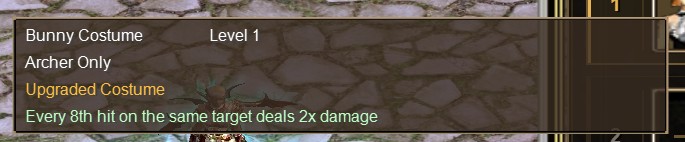
 Bunny Costume | Every 8th hit on the same target deals 2x damage “Hunter's Mark” Hits are counted per target. Every 8th hit on the same target deals double damage, then the count starts again. |
The tooltip of an upgraded costume shows its name, Level 1, the class, the gold Upgraded Costume label and the perk.
Step 1: Upgrade Your Costume
Costumes are upgraded in the item combination window, at the same NPC where you craft the Oblivion Shard. The recipe is the Oblivion Shard recipe, but you place your costume in the bottom slot (the item you wish to modify) instead of the Grade 10 armor piece.
- Base runes: Ur (1), Thorn (2) and Ken (3)
- Parchments: Infernal Ember Parchment, Aqualume Essence Parchment, Zephyr Gale Parchment, Terran Essence Parchment, Lumina Radiance Parchment and Umbral Shadow Parchment
- The costume you want to upgrade
- The combination fee of 10,000 Woonz
The upgrade always succeeds and gives you back the same costume, now upgraded. Unidentified costumes can be upgraded too. Here is the combination for the Bunny Costume. Every costume uses the same recipe, with that costume in the bottom slot.
Upgraded Costume
Item will not be destroyed if crafting fails!
Success Rate: 100%


Before you upgrade: the costume becomes a Level 1 plain item labelled "Upgraded Costume". Its old level, options and helmet stats are gone, it can no longer be worn in the helmet slot, and it becomes bound to your character. A costume can only be upgraded once.
Step 2: Place It in a Costume Slot
Open the Power-Ups window with the J key or the Power-Ups button on the HUD and go to the Costume tab. Warriors get 3 costume slots; Holy Knights, Mages and Archers get 2.
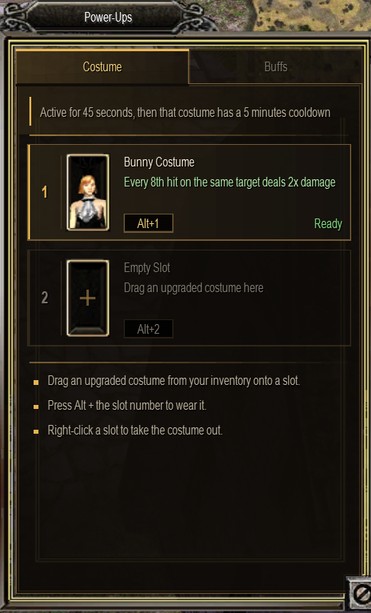
Each slot shows its number, the costume icon and name, its perk, its hotkey (Alt+1, Alt+2 or Alt+3) and its status:
- Ready: the costume can be activated.
- Active m:ss: the costume is on and shows the time left.
- Cooldown m:ss: the card turns red with a draining bar and the icon is greyed out until the costume is ready again.
- Placing: drag an upgraded costume from your inventory onto an empty slot. Only upgraded costumes of your own class are accepted, and the same costume can't be placed in two slots.
- Removing: right-click the slot and the costume goes to the first free space in your inventory, or drag it from the slot onto an inventory square.
- Reordering: drag a costume from one costume slot to another.
You can't remove, move or reorder a costume while it is active.
Step 3: Activate It
Press Alt + the slot number (Alt+1, Alt+2 or Alt+3). Only Warriors have slot 3; for the other classes, Alt+3 keeps its normal function.
- Your character transforms into the costume for 45 seconds and the perk is on. Everyone around you sees the transformation.
- While it is active, a small timer tile with the costume portrait and the seconds left appears at the top of the screen, next to the map name box.
- Only one costume can be active at a time. Pressing another costume's hotkey shows "Another costume is already active."
- If you wear a plain costume in your helmet slot, the activated costume shows instead of it for the 45 seconds. Your normal look comes back afterwards.
Cooldowns and Chaining Costumes
When its 45 seconds end, that costume goes on a 5 minute cooldown. Pressing its hotkey during the cooldown shows "Costume cooldown: N sec remaining.", and its tooltip shows the same line in red.
Each costume has its own cooldown. Your other costumes stay Ready, so you can chain them: when one ends, start the next. With 3 slots, Warriors get the most out of this.
When a costume's cooldown ends, the Power-Ups button on the HUD glows gold to tell you it is ready again.
When an Active Costume Ends Early
- Dying ends the active costume immediately.
- Entering the Arena, logging out, disconnecting or relogging ends it.
- Moving to another map through a normal zone warp does not end it: it carries over with its remaining time.
- In every case, the cooldown keeps running.
Perk Rules in PvP
- Perks work in PvP only (damage between players), in the open world and in the zone arenas.
- Perks are applied as a final damage multiplier.
- Stacking: on each hit, only the attacker's single strongest damage bonus and the target's single strongest damage reduction count. Bonuses from several costumes or auras do not add up. Counters (Bloodlust stacks, Hunter's Mark hits) still keep counting on every hit.
- Perks never affect healing. Potions, candies and AutoPot work normally for everyone.
- Perks do not apply to reflected damage, pets or hired soldiers.
- Costumes can't be activated, and perks don't work, in the Arena (battle rooms and lobbies).
Upgraded Costume Restrictions
An upgraded costume is bound to your character. It cannot be:
- Worn in the helmet slot (the game says "Upgraded costume should be placed in costume slots.")
- Traded, given away, sold to an NPC, put in storage or sold in a personal shop
- Remodelled with stones
- Dropped
Plain costumes that are not upgraded keep all their old behaviour.
Where the Transformation Is Not Visible
- In the Arena, other players are drawn with a fixed model, so the costume does not show there.
- If another effect transforms you (a morph), it hides the costume.
FAQ
Do I lose my costume's look?
An upgraded costume can't be worn in the helmet slot anymore, so it no longer changes your look all the time. You wear it for 45 seconds each time you activate it. To keep a permanent look, keep a plain costume in your helmet slot.
Can I trade or sell an upgraded costume?
No. It is bound to your character and can't be traded, sold, stored or dropped.
What happens if I die?
The active costume ends immediately, and its cooldown keeps running.
Does it work in the Arena?
No. Costumes can't be activated in the Arena, and entering it ends an active costume.
Can I use two costumes at once?
No. Only one costume can be active at a time. When it ends, you can activate another costume that is Ready.
Does the cooldown reset if I relog?
No. Relogging ends an active costume, but the cooldown keeps running.
Can I upgrade a costume twice?
No. A costume can only be upgraded once.
Hammerd Costume
Can be Equipped to Helmet Slot
Transforms Character to Hammerd
Terran Essence Parchment
One of the main ingredients to craft Oblivion Shard.
Sell Price: 5,000,000
Princess Costume
Can be Equipped to Helmet Slot
Transforms Character to Princess
Tuxedo Costume
Can be Equipped to Helmet Slot
Transforms Character to Tuxedo
Ken (3)
Used in combination / Crafting/ Reloading
Buy Price: 20,000
Mistress Costume
Can be Equipped to Helmet Slot
Transforms Character to Mistress
Lumina Radiance Parchment
One of the main ingredients to craft Oblivion Shard.
Sell Price: 5,000,000
Aqualume Essence Parchment
One of the main ingredients to craft Oblivion Shard.
Sell Price: 5,000,000
Maid Costume
Can be Equipped to Helmet Slot
Transforms Character to Maid
Karterian Costume
Can be Equipped to Helmet Slot
Transforms Character to Karterian
Boss Karterian Costume
Can be Equipped to Helmet Slot
Transforms Character to Boss Karterian
Bunny Costume
Can be Equipped to Helmet Slot
Transforms Character to Bunny
Rawak Costume
Can be Equipped to Helmet Slot
Transforms Character to Rawak
Umbral Shadow Parchment
One of the main ingredients to craft Oblivion Shard.
Sell Price: 5,000,000
Thorn (2)
Used in combination / Crafting/ Reloading
Buy Price: 20,000
Zephyr Gale Parchment
One of the main ingredients to craft Oblivion Shard.
Sell Price: 5,000,000
Infernal Ember Parchment
One of the main ingredients to craft Oblivion Shard.
Sell Price: 5,000,000
Ur (1)
Used in combination / Crafting/ Reloading
Buy Price: 20,000